

How to Spot AI Slop in Design
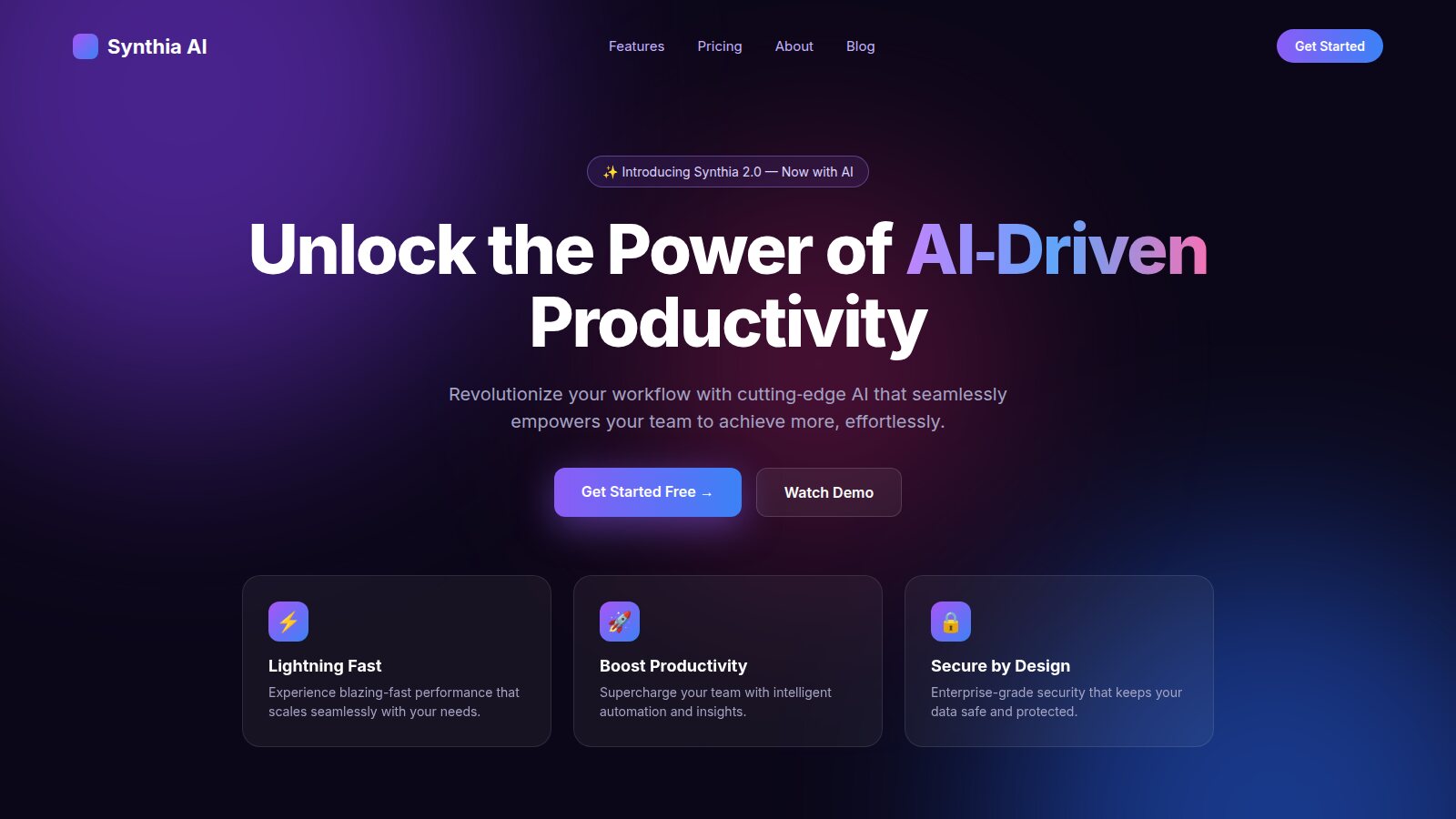
You have seen this website. You have probably seen it a hundred times this month. Dark background, violet glow, a gradient headline promising to unlock something, and three cards underneath with emoji in them.
The page above is a mockup I made for this article, and it took about two minutes, because I did not have to make a single decision. That is the point. AI slop is not "design made with AI". Plenty of excellent work is made with AI now. Slop is design where nobody made a decision, so every choice falls back to the statistical average of everything the model has seen.
Learning to see it is a useful skill, whether you are reviewing a junior's work, auditing a vendor, or checking your own output from an agent before it ships. Here is what I look for.
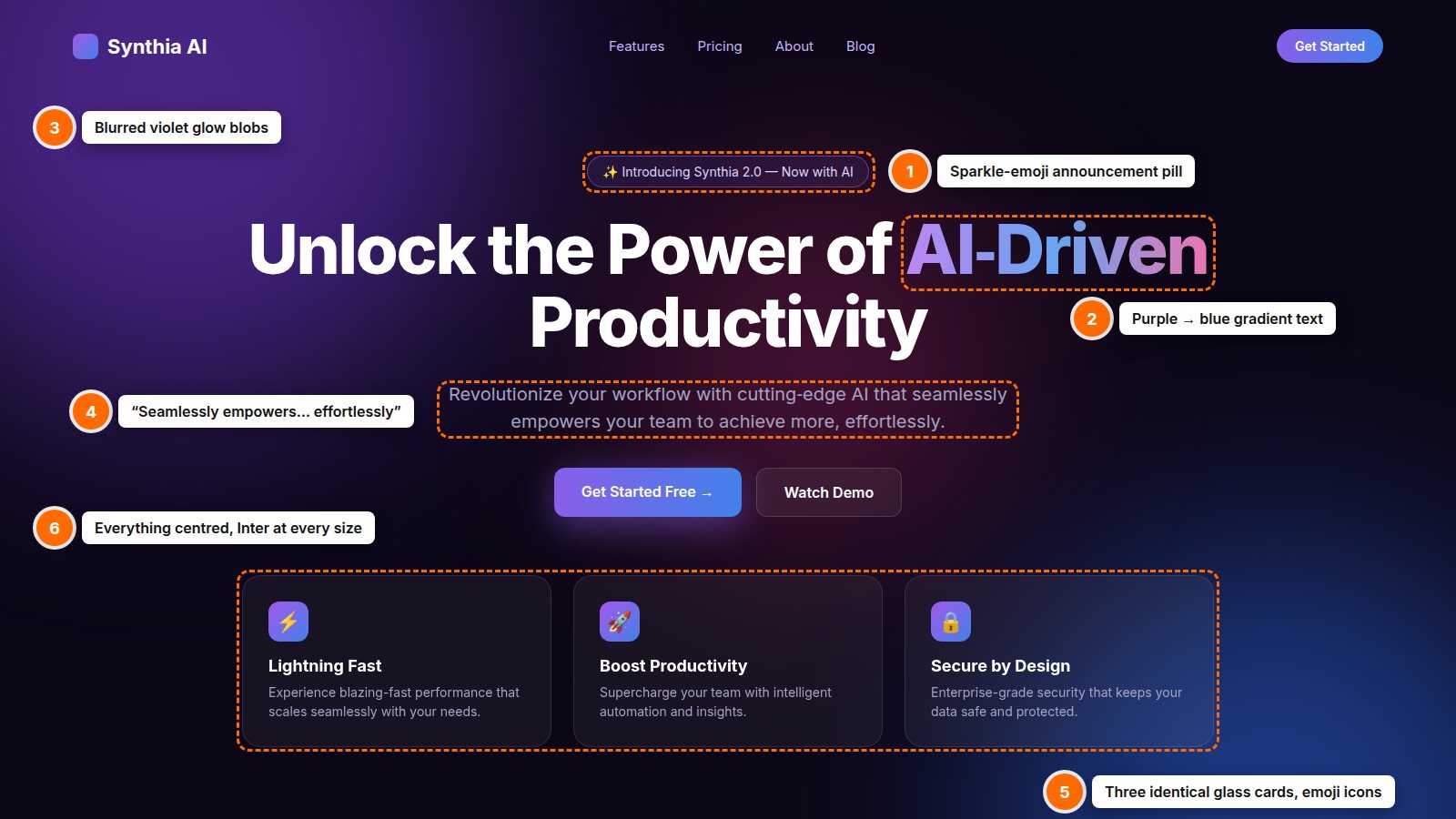
Six tells in one hero section. Illustrative mockup; the company is fictional.
1. Typography: One Font Doing Every Job
Type is usually the fastest giveaway, because the default is so consistent. Look for:
- The same sans serif for everything. Inter, or something that looks exactly like it, for the headline, body, buttons, labels and footer. When one typeface does every job, the only hierarchy left is size and weight, so everything gets bigger and bolder to compensate.
- Extra-bold headlines with tight tracking. A 700 or 800 weight, letter-spacing pulled in, set as large as the viewport allows. It reads as "confident" in a screenshot and as shouting on a real screen.
- Gradient-filled words. One or two words in the headline filled with a purple-to-blue or pink gradient. It is decoration standing in for an idea.
- Everything centred. Headline, subhead, buttons, cards, all on the centre axis. Centring is a fine choice for a single line. As a default for a whole page it removes any sense of reading direction.
- No typographic details. Straight quotes instead of curly ones, no thought about numerals, no hanging punctuation, no considered line length. Body copy stretching 120 characters wide.
The fix is not "use a serif". It is to choose type on purpose, with a reason you could say out loud. I wrote about my process for that in Picking Fonts for the Web.
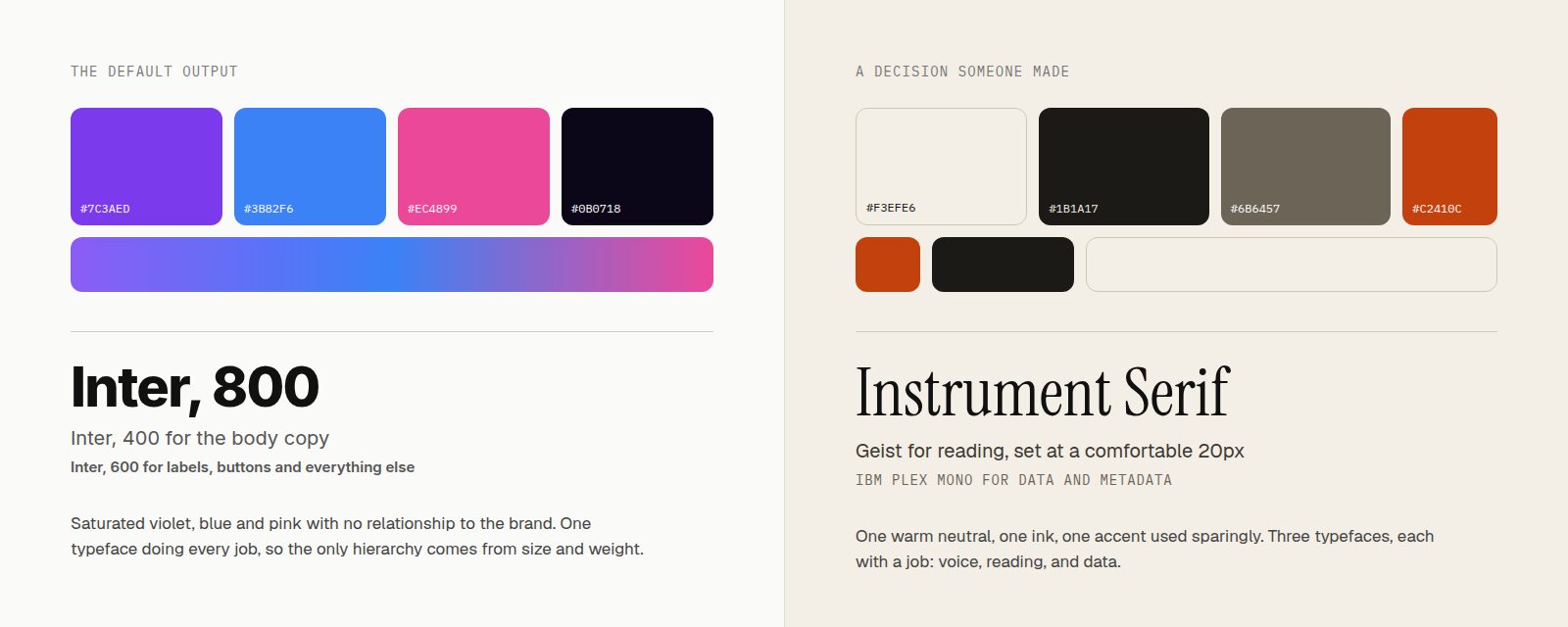
Left: the default. Right: a palette and type system someone actually chose.
2. Colour: The Violet Default
If you asked me to name the colour of AI slop, it would be somewhere around #7C3AED. Violet, blending into blue, sometimes with a pink third stop. The tells:
- Purple-to-blue gradients on buttons, icons, text and backgrounds, often all at once.
- Blurred glow blobs floating behind the hero, usually violet in one corner and blue in the other.
- Dark mode by default, for a product that has no reason to be dark. Near-black backgrounds with a faint purple tint.
- Low-contrast grey text on dark backgrounds, which looks moody and fails accessibility checks.
- The accent used everywhere. When every button, icon, border and highlight is the brand colour, nothing is highlighted.
- No relationship to the brand. The colours could belong to any company. Ask why this colour, and there is no answer.
Considered palettes tend to be smaller than you expect: a background, an ink, a muted secondary, and one accent that is used sparingly enough to mean something.
3. Layout: The Template Everyone Shares
The slop landing page has a structure so consistent you can predict it before scrolling: announcement pill, centred hero, two buttons (one filled, one ghost), a row of greyed-out logos, three feature cards, a testimonial carousel, a pricing table with the middle tier highlighted, a gradient CTA band, a four-column footer.
None of these sections is wrong by itself. The tell is that the structure came first and the content was poured into it, rather than the content deciding the structure. Look for:
- Cards in threes, all identical in size, with the same icon tile, title length and two-line description.
- Glassmorphism by default: translucent cards with a 1px white border and a background blur, over nothing in particular.
- One radius for everything. Buttons, cards, inputs, images and modals all at the same 12 or 16px, with no thought about nesting.
- Symmetry everywhere. Real content is uneven. Perfectly balanced grids usually mean the content is placeholder.
4. Iconography and Imagery
- Emoji as icons. The lightning bolt for speed, the rocket for growth, the padlock for security. Often sitting in a gradient rounded square.
- The sparkle. ✨ in an announcement pill, on a button, next to anything involving AI.
- Abstract 3D blobs and orbs instead of showing the product.
- Generated people with too-smooth skin and nothing specific about them, used as testimonials or "our team".
- No product. This is the big one. A page about software that never shows the software is hiding something, or has nothing to show.
The swap test: cover the logo and replace it with a competitor's. If nothing on the page breaks, no part of it was designed for this company.
5. Copy: Words That Mean Nothing
Copy is part of the design, and slop copy has its own vocabulary: unlock, unleash, empower, elevate, seamless, effortless, cutting-edge, revolutionise, supercharge, next-generation. Some more patterns to listen for:
- Benefits without specifics. "Boost productivity" instead of "close your books in three days".
- Triplets. "Fast, secure, and scalable." Three adjectives, no evidence for any of them.
- "Get Started" as every call to action, without saying what starts.
- Fake social proof. "Sarah J., Marketing Manager" with a generated headshot and a quote any product could use.
- No numbers, names or nouns. Real products have real constraints: prices, limits, integrations, customers, dates.
6. The Details Nobody Thought About
The surface of a slop page can look polished. The giveaway is what happens around the edges:
- Buttons with no hover, focus, pressed or disabled state.
- No empty states, error states or loading states, because nobody imagined the product being used.
- The same drop shadow on every element.
- A mobile layout that is just the desktop layout, stacked.
- Animations that fade everything up on scroll, identically, whether it helps or not.
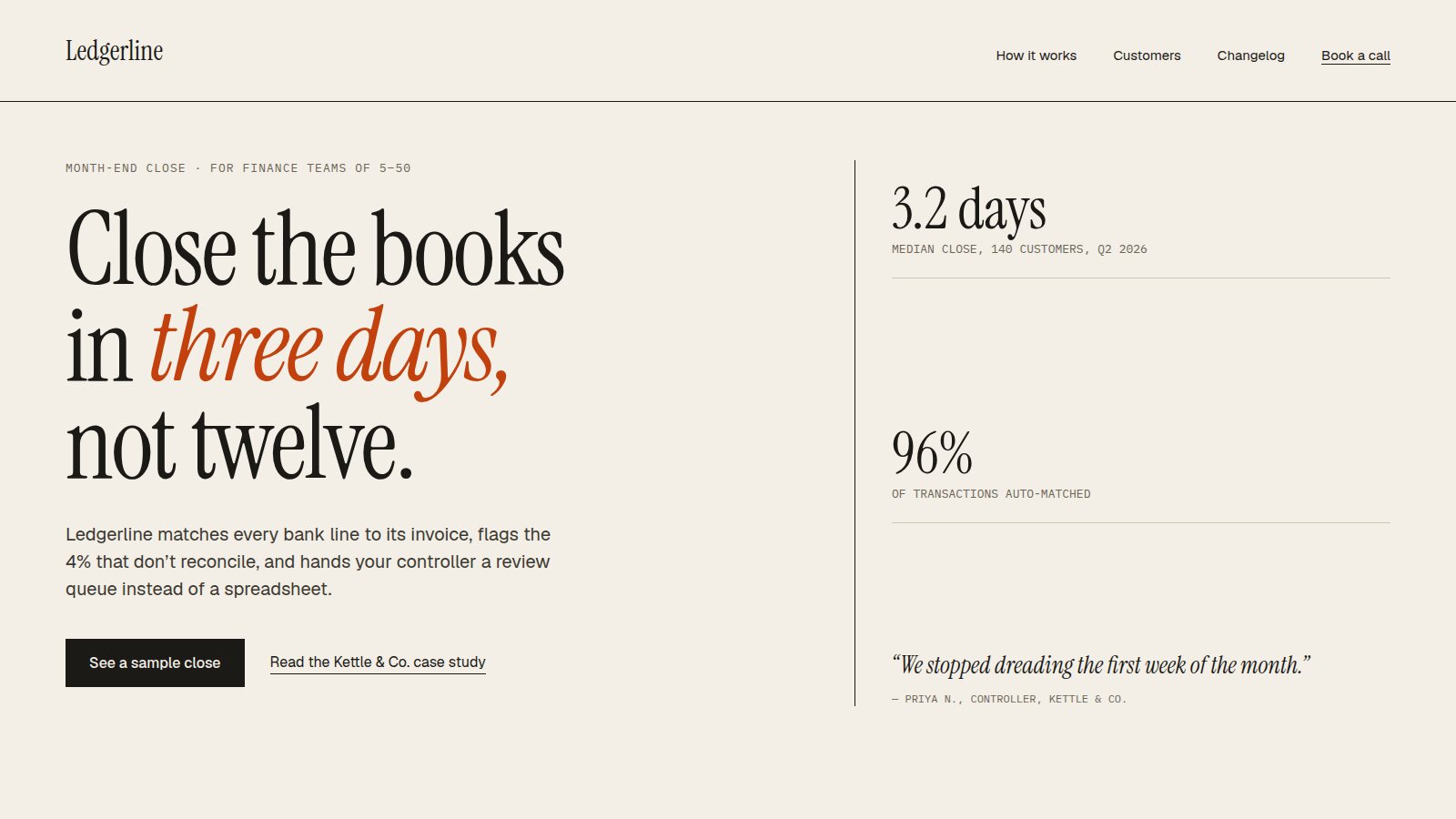
The same brief with decisions made: specific audience, specific claim, type with a job. Illustrative mockup; the company and figures are fictional.
How to Fix It
The page above was also built with AI, in roughly the same time. The difference is that I made the decisions first and let the tool execute them. A few habits that help:
- Start from the content. Write the real headline, with a real claim and a real number, before anything visual. Specific words force specific layouts.
- Decide the type and palette yourself, and write down why. If you cannot explain a choice, it is probably a default.
- Constrain the model. Give your agent a design spec (a DESIGN.md) with your typefaces, colour roles, spacing and a list of things it is not allowed to do. "No gradients, no emoji icons, no centred body copy" removes half the slop on its own. I go deeper into this in Reverse Engineering Interfaces in the Age of Agents.
- Show the product. Real screenshots beat abstract illustrations every time.
- Run the swap test before you ship.
The Real Problem Is the Default
It is tempting to blame the tools. But the generic SaaS template existed long before language models; AI just made it free. What changed is that the cost of producing something that looks finished has dropped to almost nothing, so finished-looking is no longer a signal of quality.
What is still a signal is evidence of choices: a typeface with a reason, a colour that belongs to this brand, copy that could only describe this product. That is the work now. Not making things look designed, but making sure they actually were.