
Progressive Blur in SwiftUI: How It Elevates UI When Paired with Liquid Glass
iOS 26 ships with two interlocking design primitives that, separately, are useful. Together, they change what a native app can feel like.
Progressive blur, what Apple now ships as scroll edge effects in SwiftUI and UIKit, has existed in various forms since the days of the translucent tab bar. But in iOS 26, it has been formalized into an explicit system with a proper API, two distinct styles, and an opinionated design philosophy. Liquid Glass, introduced at WWDC 2025, gives those progressive blurs something to be in dialogue with. The result is a visual language that feels genuinely new, not just visually, but structurally.
This piece is about how that combination works, why it matters, and how to implement it deliberately.
What Progressive Blur Actually Is
A progressive blur is a gradient where the blur intensity increases across a spatial axis, typically from transparent at one edge to fully blurred (and slightly opaque) at another. You have seen this in every modern iOS app: when you scroll a list beneath a toolbar or tab bar, the content doesn't just disappear behind a hard edge. It dissolves into a soft haze.
That dissolve is doing real work. It tells the user where the interactive surface ends and the navigational chrome begins. It preserves the sense that the content is still there, just receding behind a layer. Hard dividers break that illusion. Progressive blur maintains it.
Before iOS 26, this effect was handled inconsistently. Some apps built it with custom blur overlays, others relied on system behavior they didn't fully control. iOS 26 formalizes it as ScrollEdgeEffectStyle with two explicit options:
Soft: the default for Liquid Glass
The soft style applies a subtle, graduated blur that transitions from fully transparent at the content edge to partially blurred at the control edge. It reads as atmospheric. Content feels like it passes under a glass surface rather than disappearing behind a wall. This is the correct style to pair with Liquid Glass elements like tab bars and toolbars.
// Soft is the default on iOS, no code needed for system bars
// For custom scroll containers:
ScrollView {
    LazyVStack { ... }
}
.scrollEdgeEffectStyle(.soft, for: .all)
Hard: for dense, structured UIs
The hard style draws a more defined, opaque boundary. Think Calendar's day view, where a clear line separates the pinned time header from the scrolling events. Or a macOS inspector panel. Hard is not visually inferior. It's contextually correct. When the content is information-dense and the user needs a clear horizon line, soft would feel vague where hard feels precise.
ScrollView {
    CalendarGrid()
}
.scrollEdgeEffectStyle(.hard, for: .top)

// Remove when you need complete transparency
ScrollView { ... }
.scrollEdgeEffectHidden(true, for: .bottom)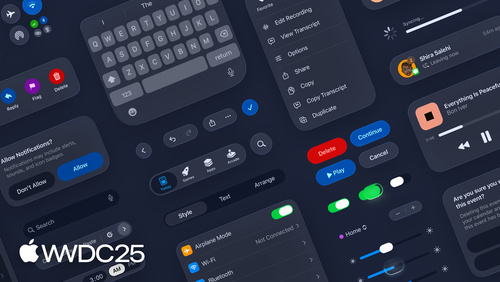
WWDC25 Session 356: Get to know the new design system. Image: Apple.
What Liquid Glass Actually Is
Liquid Glass is Apple's name for a new dynamic material introduced in iOS 26. It blurs the content behind it, reflects color and light from the surrounding environment, and responds physically to touch and pointer input in real time. Apple calls it a material, and that framing is intentional. It behaves like a physical substance, not like a filter effect.
The key properties that distinguish it from previous blur materials:
- Lensing: it bends and concentrates light the way real glass does. Larger surfaces simulate thicker glass with deeper refraction and more pronounced edge shadows.
- Tinting: it reads nearby colors and tints itself accordingly. Put it over a bright red image and the glass takes on a faint warmth. This is generative, not preset.
- Specular response: highlights shift with device motion. Tilt the phone and the glass catches the light differently.
- Organic interaction: on touch and hover, it flexes and brightens. The interaction model is tactile, not flat.
It ships automatically on rebuilt apps. Tab bars, toolbars, navigation bars, sliders, action sheets, and sheets all become Liquid Glass when compiled against the iOS 26 SDK. You do not opt in. You opt out if you need to.
Liquid Glass is the direct descendant of Apple Vision Pro's spatial interface work. The design problem on visionOS, how do you make a floating panel legible and beautiful in three dimensions over unknown background content, turns out to have a 2D answer that works just as well on a phone.
Why They Belong Together
Liquid Glass floats. Progressive blur is the transition between what floats and what sits beneath. These two systems are not independently interesting. Their value is architectural.
Apple now describes the iOS UI as having two explicit layers: a content layer below, and a navigation and controls layer above. Liquid Glass lives in the upper layer. Progressive blur is the seam between them.
Without progressive blur, the Liquid Glass tab bar sits on top of content with no managed transition. Users see content partially visible behind glass, potentially fighting with it visually. The soft scroll edge effect handles this: as content approaches the Liquid Glass surface, it softens, recedes, and lets the glass remain legible regardless of what is scrolling underneath. The effect adapts. A bright white background behind the glass transitions differently to a dark photograph, and the progressive blur absorbs both cases gracefully.
The practical result is that you stop thinking about collision management between content and controls. The system handles it. Your job as a designer or developer narrows to choosing whether you want soft or hard, and whether any specific edge should be suppressed.
Building Custom Glass with GlassEffectContainer
For custom Liquid Glass surfaces, specifically controls outside the standard system bar pattern, SwiftUI provides glassEffect() and GlassEffectContainer. The container is the important part: it groups glass views for performance, and critically, enables shape blending when elements are close together.
// Basic glass surface
MyControl()
    .glassEffect(in: .capsule)

// Group glass elements, enables morphing transitions
GlassEffectContainer(spacing: 40.0) {
    HStack(spacing: 40.0) {
        ButtonA()
            .glassEffect()
            .glassEffectID("a", in: namespace)
        ButtonB()
            .glassEffect()
            .glassEffectID("b", in: namespace)
    }
}

// Interactive, gets touch/hover response
FloatingControl()
    .glassEffect(.regular.interactive())
The spacing parameter on GlassEffectContainer controls the distance at which glass shapes begin to merge. Set it to 40 and two glass buttons that drift within 40 points of each other will organically fuse into a single surface. Pull them apart and they separate. This is the morphing behaviour you see in native popovers and menus, a button expanding into a larger glass panel.
When building custom glass elements that float over scroll content, pair them with safeAreaBar to get the progressive blur automatically:
// Custom floating control gets scroll edge blur for free
ContentScrollView()
    .safeAreaBar(edge: .bottom) {
        GlassEffectContainer {
            MyCustomToolbar()
                .glassEffect()
        }
    }
WWDC25 Session 323: Build a SwiftUI app with the new design. Image: Apple.
The Design Principles Behind Both
Apple articulates several principles that apply to both systems and should shape how you use them:
Content is primary. Both Liquid Glass and progressive blur exist to serve content visibility, not to add visual interest. If either effect draws more attention than the content beneath it, you have overcorrected. The best applications of these systems are ones users describe as "clean". They are not noticing the effect, they are experiencing the benefit of it.
Do not stack effects. One scroll edge effect per view. Do not layer custom blur overlays on top of system scroll edge effects. The redundancy does not reinforce the effect. It degrades it. Similarly, avoid placing multiple Liquid Glass layers in close proximity unless the morphing behaviour is intentional.
Strip custom backgrounds from system chrome. Navigation bars, tab bars, and toolbars that have had their background colours overridden will conflict with Liquid Glass. Remove them. Let the system appearance handle it. This is the most common adoption mistake.
Materialization over opacity. Liquid Glass does not appear or disappear by fading. It materializes, modulating the light-bending behaviour rather than the transparency. When writing custom transitions for glass surfaces, use .glassEffectTransition(.materialize) rather than plain .opacity. This preserves the optical integrity of the material.
Concentricity. Shape radii are not arbitrary. Apple's design system expects corner radii to be concentric with their containers and with the hardware. Use .rect(cornerRadius: containerCornerRadius - padding) or the built-in .containerConcentric option where available. This is the difference between controls that feel native and controls that feel designed-in-isolation.
The Bigger Picture
The combination of progressive blur and Liquid Glass is not a visual trend. It is Apple formalizing something that the best native apps have always done intuitively, managing the visual relationship between content and controls with care, and providing a proper primitive for it.
What is genuinely interesting about this is the trajectory. Liquid Glass came directly from visionOS, where the design problem of floating interfaces over arbitrary environments is existential. Apple solved it for spatial computing and then brought the solution back to the 2D screen. Progressive blur formalizes the transition zone that every app using Liquid Glass needs. The two systems were always going to ship together.
For designers, the practical implication is simpler: stop managing layering manually. The system has an opinion. Work with it. Build your custom controls inside GlassEffectContainer, attach them with safeAreaBar, pick the edge effect style that matches the content density, and remove whatever custom backgrounds you have added to system bars. The interface will look better than anything you could build by fighting the system.
That is not a creative limitation. That is what a mature platform looks like.